DNS Record Types
How does a browser know where a website lives?
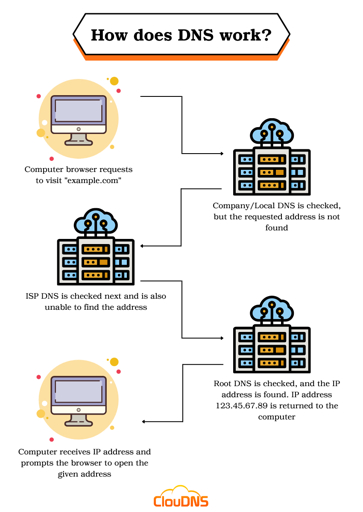
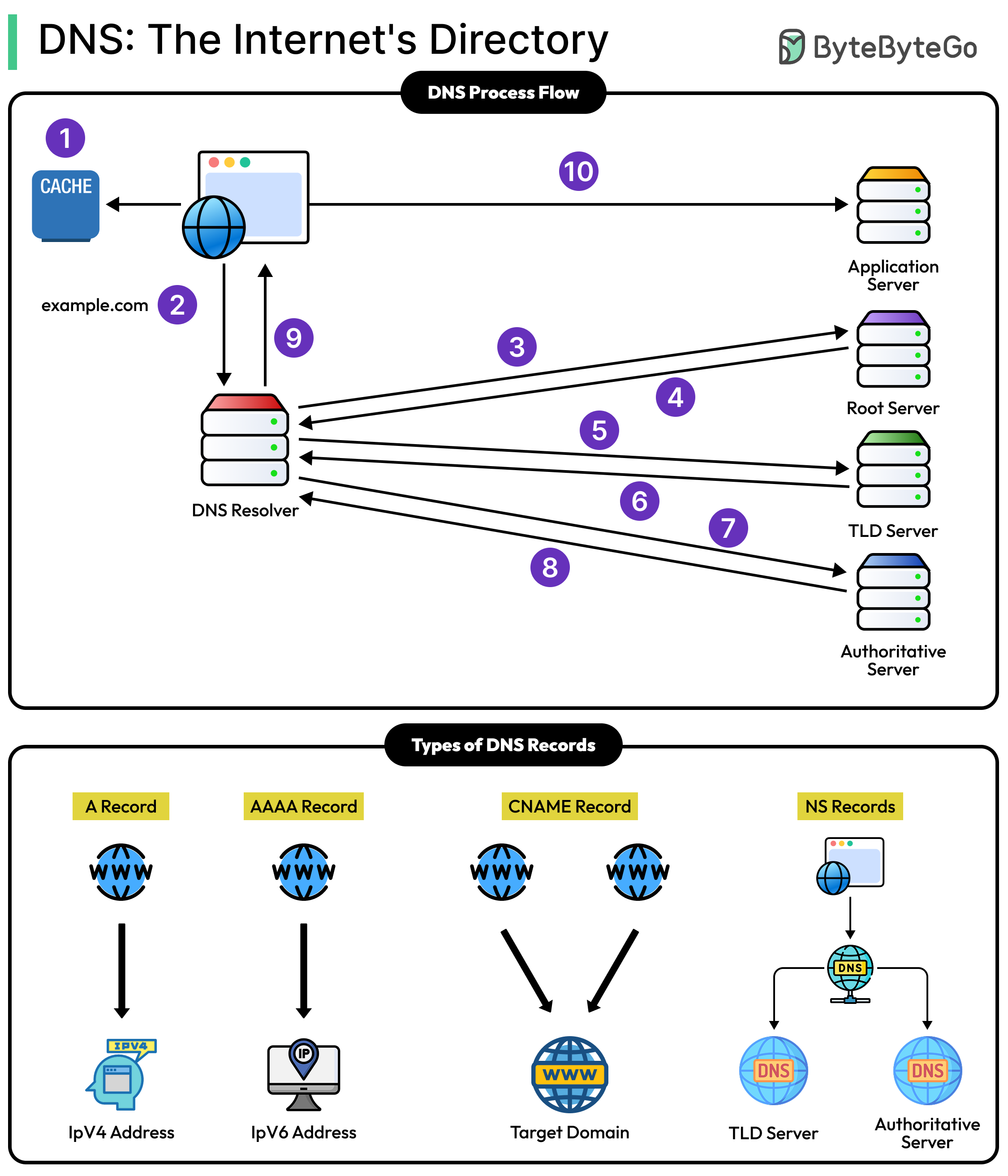
Our browser translates a website's name, like "google.com", into a numerical IP address using DNS(the internet's phone book).When we enter a URL, the browser first checks in the local cache of the browser for the IP. If it is not found, it queries our device's DNS resolver, which asks root DNS servers, then TLD servers (like .com), and finally the site's authoritative server to get the exact IP address.
With the IP we get back from dns, the browser establishes a connection often via HTTPS—sends an HTTP request for the page, and the server responds with HTML, images, and other resources. This happens very fast, i.e., in milliseconds.
Lets take an real like example with user wants to read a book :

What is DNS?
DNS is like the internet’s phone book. When we type a website name (like example.com), DNS translates it into the numbers (IP address) that computers use to locate that site. So we don’t have to remember long numbers(192.168.0.0 – 192.168.255.255) , the DNS does the lookup for us. DNS is like a map that guides our device to the right online address.
Why DNS records are needed ?
DNS records are essential instructions stored on a DNS servers that tells the browser exactly where to find a website and its services.DNS translate human redable domain names into a machine readbale IP addresses, elimating the need to remeber the complex numbers like **192.168.0.0 . Without DNS records browser couldn’t trsnalate the '“ example.com “ into a correct server location .DNS Records are flexible, if a website changes servers, we just update the A record, and the users can keep using the same domain name. They also support security through TXT records for verification and SPF to prevent email spoofing.
What is an NS Record?
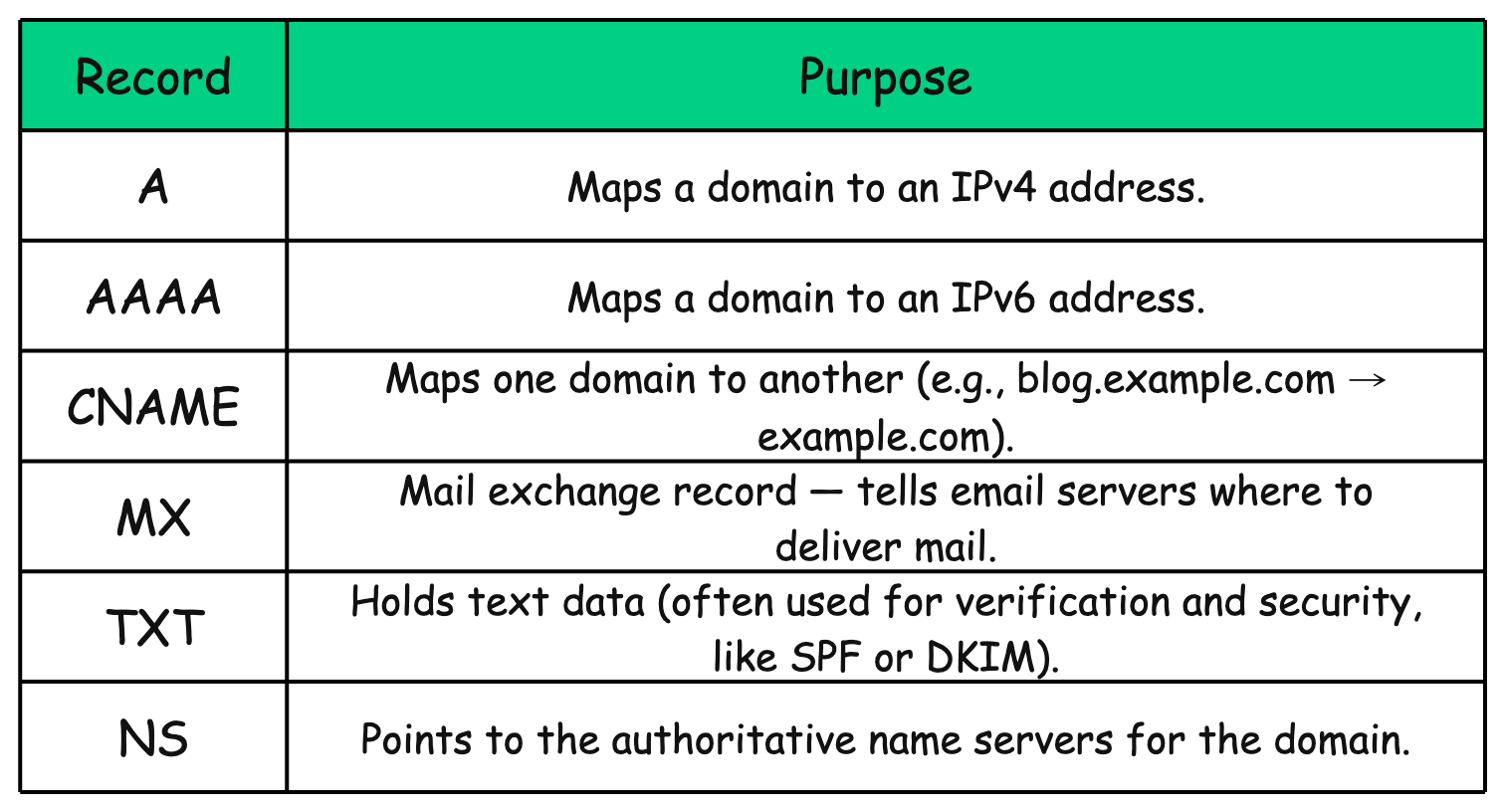
NS (Name Server) record, lists the DNS servers responsible for a domain ,like pointing to the "boss/super admin" servers that manage all its details. It tells the internet which nameservers hold the authoritative info, such as IP addresses or email settings, for that domain.
Domains usually have 2+ NS records for redundancy.They're set at our DNS provider and must pair with A/AAAA records for the nameservers themselves.
What is an A Record ?
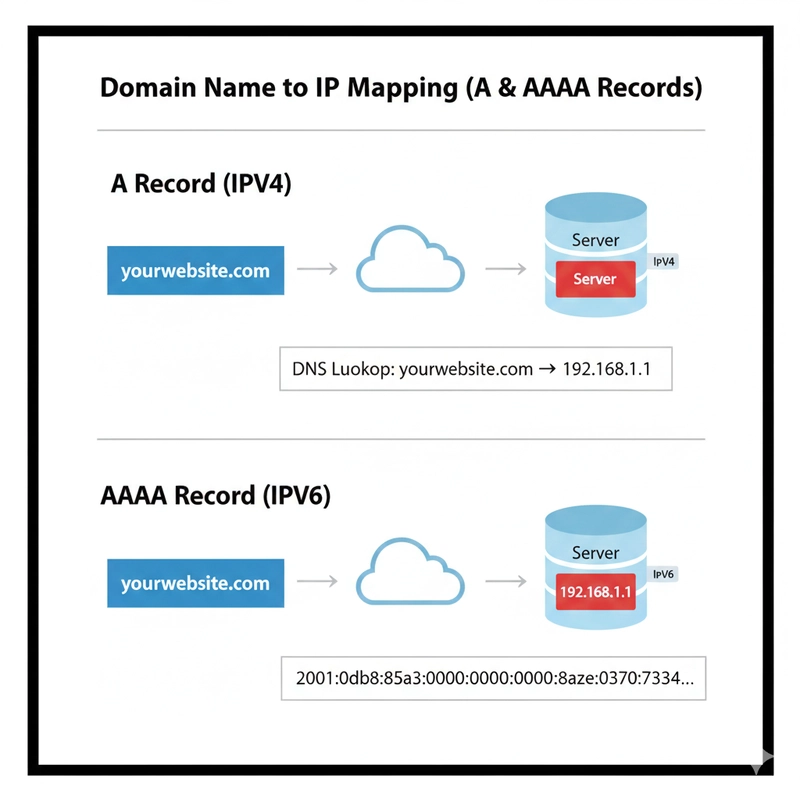
An A record is a simple DNS entry that links a domain name (like example.com) to its IPv4 address (like 192.0.2.1), acting like a phonebook listing to help our device find the right server online.
Without A records, we would need to memorize/remember and enter numeric IP addresses (complex numbers) for every site, making the internet unusable ,its like trying to call friends by their exact phone numbers instead of names. Multiple “ A “ records can even point to different IPs for load balancing across
Imagine if we want to visit google.com in our browser. Instead of typing the complex IP address ( 142.250.190.14), our device checks DNS servers for Google's A record, which provides that exact IPv4 address so our browser connects directly to their servers.
What is an AAAA Record?
An AAAA record is a DNS entry that links a domain name (like example.com) to its IPv6 address ( like 2001:0db8:85a3:0000:0000:8a2e:0370:7334), it is similar like an A record which does for IPv4 but here it does for IPv6, an expanded internet addressing system.
AAAA records ensure websites work on future-proof IPv6 networks, often alongside A records (IPv4) for compatibility,our phone picks the best match automatically. Without them, IPv6 users might fail to load sites still stuck on IPv4-only setups.
Think as it like updating a city’s old phonebook from old 4-digit numbers (IPv4, running out of options) to new 16-digit numbers (IPv6, plenty to go around).
What is a CNAME Record?
A CNAME record is a DNS entry that creates an alias(stagename / nickname), pointing one domain name ( www.example.com) to another domain name ( example.com), which then resolves to an IP address via its own A or AAAA record.Unlike A records (old -direct to IPv4) or AAAA ( modern-direct to IPv6), CNAMEs links name to name, not to IPs, adding a slight extra lookup step but simplifying management if the target IP changes.It can't mix with other records on the same name, like MX for email.
Think like a company's website where "masterji.chaiCode.com" has a CNAME record pointing to "chaiCode.com". When we type the msaterji address into our browser, DNS follows the alias(nickname/stagename) to the main site, grabs its IP (like from an A record), and loads the page ,which is perfect for redirecting old links or subdomains without changing IPs manually.
What an MX Record ?
An MX record is a DNS entry that tells other email servers which mail server handles incoming emails for your domain, including a priority number to decide the order if multiple servers are listed.MX records enable redundancy (backup servers if the main one fails) and load balancing for high email traffic, ensuring reliable delivery even if your web server (via A record) is separate. Without them, emails to our domain might fail entirely.
Let’s take an example -when we send an email to friend@yourcompany.com, the sender's server checks your company's MX record ( pointing to mail.yourcompany.com with priority 10), connects to that server via SMTP, and delivers the message,like a postal service label directing mail to the right post office branch instead of guessing.
What a TXT Record ?
A TXT record is a flexible DNS entry that stores random(arbitrary) text data tied to a domain, originally for human-readable notes but now mainly for machine readable info like verification codes or email security policies.TXT records power SPF/DKIM/DMARC to fight email spam.
How do all DNS records work together for one website ?
DNS records work together like a football team for a website ,each player/record has its specific role to play like changin the typed url into into a loaded page, email delivery and verifciation.
Flow to show how each records work ,when we type “ www.example.com ” :
NS records first direct our device to the right DNS servers owning example.com.
CNAME ( if used ) aliases
www.example.comtoexample.comfor simplicity.A or AAAA records then provide the actual IPv4/IPv6 address to reach the web server.
MX records kick in separately for emails to @example.com, routing to mail servers like
mail.example.comTXT records add proof, like SPF text to validate senders and prevent spam.