How DNS Resolution Works
What is DNS and why name resolution exists?
DNS( Domain Name System) acts like the internet's phonebook, translating easy-to-remember names(url) like "google.com" into numerical IP addresses (like 142.250.190.78) that computers use to find each other online over the internet
Name resolution exists because we humans prefer remembering simple names then complex numbers making the web friendly while computer(network = device + wires + rules) rely on IP address for routing data
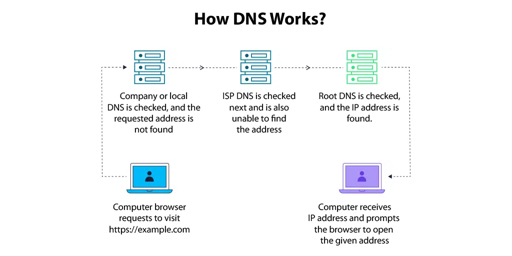
DNS Resolution Layers
DNS resolution layers break down the process of turning a domain(human-readable address) like google.com into an IP address across three key levels, like climbing a directory tree.
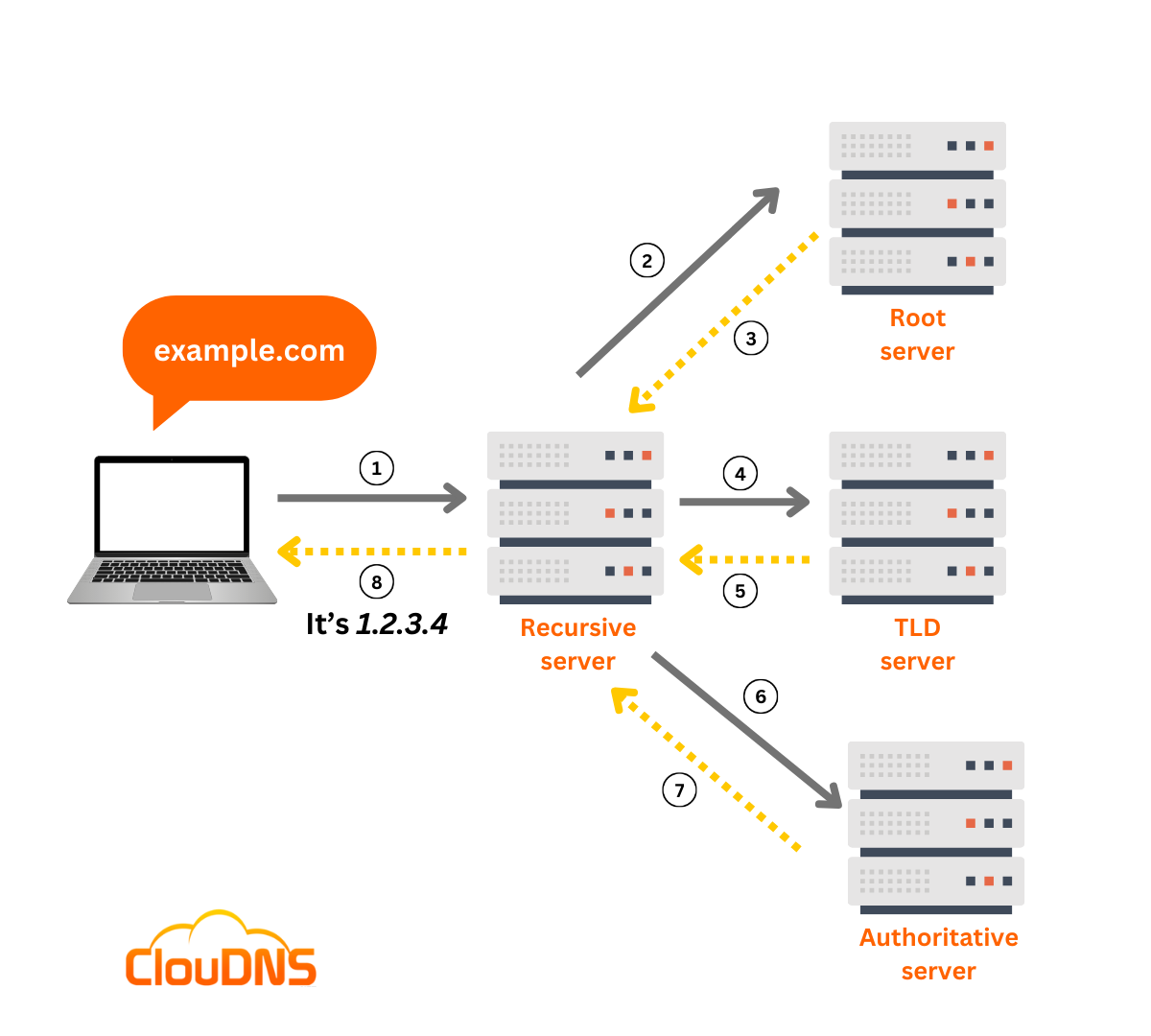
Root Servers:There are 13 global clusters denoted by “ . “ which act as the internet's starting index. They don't know specific IPs but refer queries to TLD servers (e.g., .com or .in or .edu etc).
TLD Servers :Top-Level Domain(TLD) servers handle extensions like .com, .org, or .in. They point to the domain's authoritative nameservers (NS(name server) records, e.g., ns1.google.com for google.com)
Authoritative Servers : These hold the final records (A/AAAA for IPs) for the exact domain. The resolver queries them last to get the answer, caching it for speed.
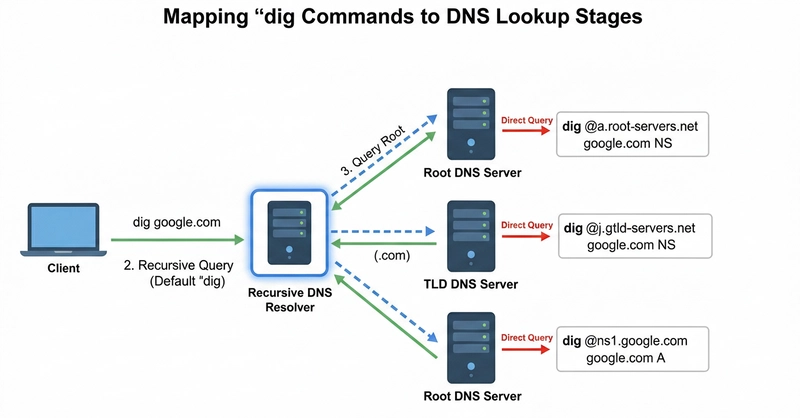
What is the dig command and when it is used ?
The “dig”(Domain Information Grope) command is a powerful command line tool for querying(requesting) DNS servers to get detailed records like IP addresses, mail servers, or name servers.DNS admins and developers use it for troubleshooting DNS issues, verifying name resolution, testing specific record types (example: A, MX, NS records), or checking server responses, offering more flexibility and clearer output .
Example: If my site “ example.com ” isn't resolving? Type dig example.com in our terminal ,it reveals the IP (like 192.0.2.1), query time, and any errors, helping spot if our DNS provider glitched.
NS records
NS (Name Server) records, are simple DNS entries that list the official servers responsible for a website's or domain's details, like its IP address
What NS Records Do : It is like a pointer telling the internet whcih nameserver manages a domain DNS deatils such as Ip addresses , or email settings.For example, when we type "example.com," DNS queries follow NS records to reach the right server for resolution.Without it, browsers couldn't find a site's IP address from its name.
NS record is Important because ,proper NS records keep domains working smoothly ,without correct NS records, no one can reach our site because the internet won't know where to look. Multiple NS records add reliability—if one server fails, others step in to prevent downtime.
Recursive Resolver Role
Behind the scenes , when we visit example.com, our device's recursive resolver (like our ISP's DNS helper) starts at the internet's root servers, follows a chain of NS records down to the DNS hierarchy (root → .com servers → domain's NS), and asks those authoritative nameservers for the final details, like the IP address. This delegation makes the whole system fast and distributed.
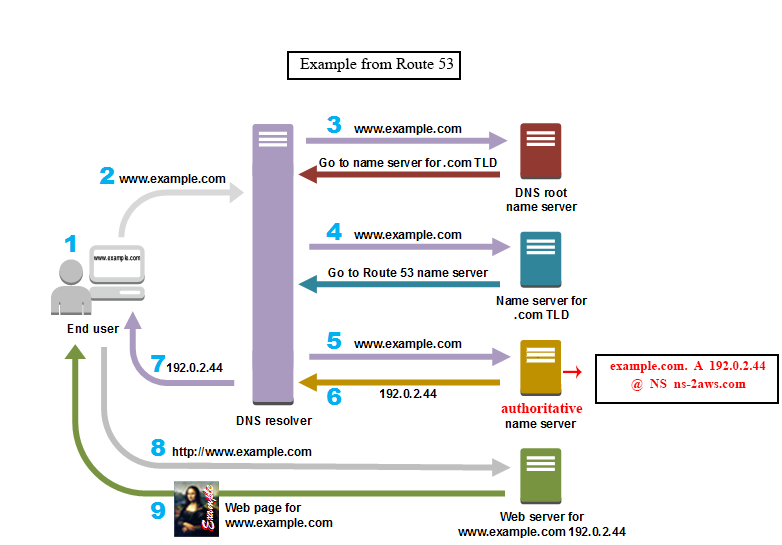
Example :When we type "google.com" in a browser, it needs the site's IP address to connect. The dig google.com command shows the DNS steps our browser takes behind the scenes to get that.Running dig google.com produces output like this in the terminal
 ; <<>> DiG 9 <<>> @127.0.0.53 goggle.com A
 ; (1 server found)
 ;; global options: +cmd
 ;; Got answer:
 ;; ->>HEADER<<- opcode: QUERY, status: NOERROR, id: 5841
 ;; flags: qr rd ra; QUERY: 1, ANSWER: 0, AUTHORITY: 1, ADDITIONAL: 1

 ;; OPT PSEUDOSECTION:
 ; EDNS: version: 0, flags:; udp: 65494
 ;; QUESTION SECTION:
 ;goggle.com.            IN    A

 ;; AUTHORITY SECTION:
 goggle.com.        300    IN    SOA    ns1.googledomains.com. cloud-dns-hostmaster.google.com. 1 21600 3600 259200 300

 ;; Query time: 32 msec
 ;; SERVER: 127.0.0.53#53(127.0.0.53) (UDP)
 ;; WHEN: Sat Feb 14 06:14:16 UTC 2026
 ;; MSG SIZE  rcvd: 121